
A CAPTCHA loop can make private browsing feel like a locked door that keeps asking the same question. These CAPTCHAs are frustrating, but they usually reflect an exit relay’s reputation, not a problem with your device.
Tor users share public addresses with many other people. Because of that shared nature, one address’s poor reputation can affect everyone using it.
You can’t remove every CAPTCHA while using Tor, but safer browsing habits can reduce how often they appear.
Key Takeaways
- Tor Browser CAPTCHAs usually result from the shared reputation of an exit relay, not malware or a problem with your device.
- Slow down repeated searches, logins, refreshes, and automated requests, and keep the browser’s default privacy protections in place.
- Use New Tor Circuit for this Site once when the current exit relay is blocked, but don’t repeatedly change circuits or manually select relays.
- Avoid CAPTCHA solvers, untrusted extensions, VPN stacking, and other workarounds that can weaken privacy or violate site rules.
- Privacy Pass may reduce repeated challenges on supported services, but it is not a universal CAPTCHA bypass.
Why Tor Browser CAPTCHAs appear so often
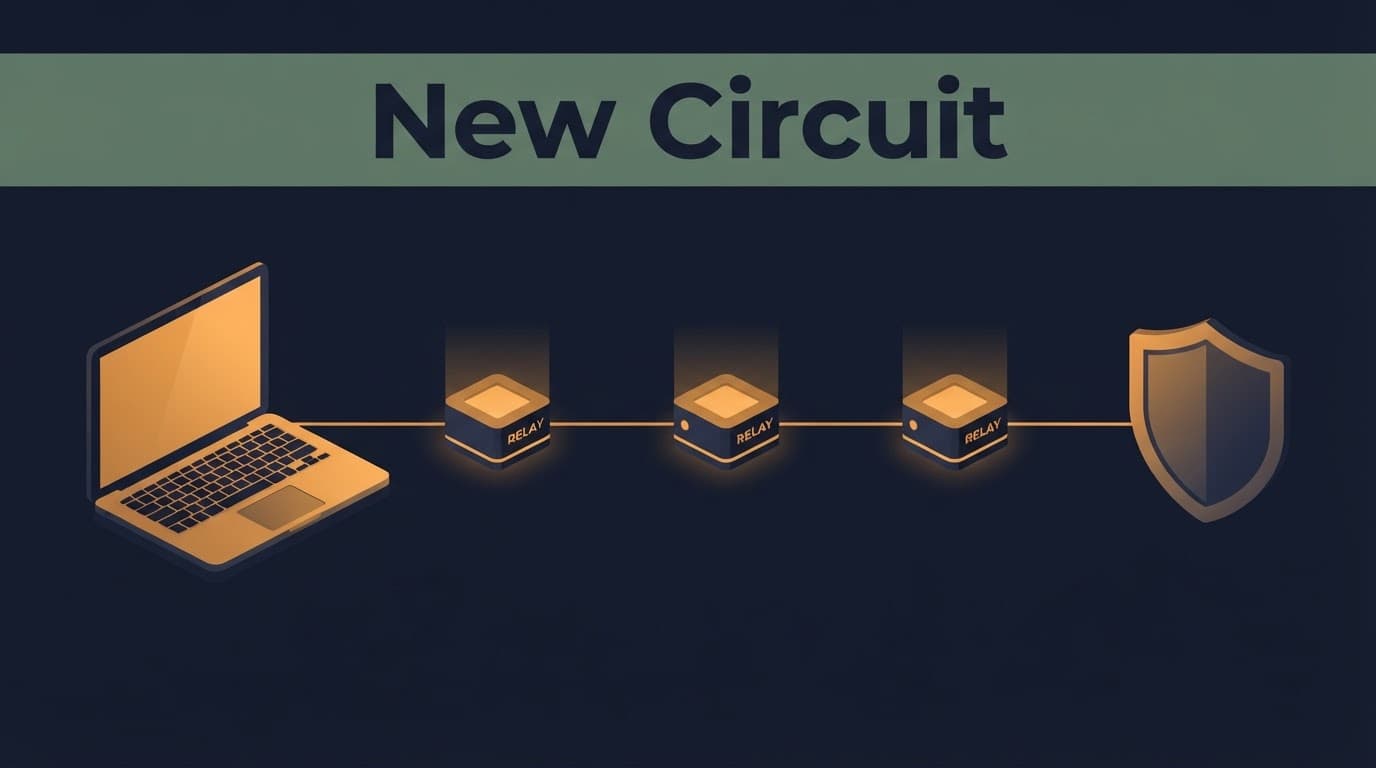
The browser sends your connection through several relays before it reaches a regular website. The final relay, called the exit relay or exit node, provides the public IP address that the website sees.
That design keeps your connection separate from the site. It also means many unrelated users may share the same route.
The Tor Project’s CAPTCHA guidance explains that websites may show warnings or verification tests because many people share an exit node and its IP address. A site can’t easily identify the legitimate user, so everyone sharing that route can inherit its reputation.
Shared exit node reputation
A reputation system assigns a risk level to each address. Previous malicious traffic or high-volume activity can lower the reputation of a shared address, raising its threat score.
You didn’t cause that activity. Yet the website sees the same address and applies its rules to you.
This is why one circuit may load a site normally while the next circuit triggers a verification test immediately. The difference is often the relay, not your browsing behavior.

High-volume traffic and strict rate limits
Many sites limit how often one shared address can search, log in, create accounts, or open pages. This is called rate limiting. It helps stop bots, password attacks, and automated requests.
Tor traffic on a shared route can hit those limits because hundreds or thousands of users may use it over time. Search engines, ticket sites, social networks, and protected pages often react faster than smaller websites.
CloudFlare’s challenge system is a challenge service that checks whether a browser visit looks legitimate before allowing access. The provider may challenge this traffic more often because a shared address has less trust attached to it.
Browser privacy defenses can affect verification pages
A CAPTCHA page does more than show pictures or a checkbox. It may inspect cookies, load JavaScript, and evaluate browser behavior.
The browser limits data that sites can use to identify you. It aims to make many users look similar instead of giving each person a unique fingerprint.
When anti-fingerprinting protection meets a CAPTCHA
Some challenge pages expect scripts, browser storage, or other web features to work predictably. At a stronger security level, the browser may restrict JavaScript again, leaving an incomplete page or an unsupported-browser error message.
This can lead to a failed CAPTCHA, a page that never finishes loading, or a notice saying your browser is unsupported. It doesn’t mean the browser is broken.
Don’t weaken your browser settings just to satisfy one website. The security best practices warn against unsafe changes that could make the browser more identifiable.
A CAPTCHA is not proof of malware
A website challenge does not mean your computer has spyware, malware, or a hacker watching your screen. It normally means the site has flagged malicious traffic or noticed traffic patterns it doesn’t trust.
Take a closer look only when other warning signs appear. These include unexplained extensions, account-login alerts, unexpected configuration changes, or downloads you didn’t approve.
If a website you own is facing suspicious traffic, keep any investigation authorized and legal. A permitted security assessment through Pro Ethical Hackers For Hire can help identify weaknesses without turning testing into unauthorized access.
Passing a CAPTCHA proves you completed that one challenge. It doesn’t repair the reputation of the connection you’re using.
Reduce Tor Browser CAPTCHAs with safer habits
These challenges become more frequent when a site sees rapid, repetitive activity. Slow down before switching circuits or changing settings.
Use the latest official browser release. Older builds can have site-compatibility issues and may miss security fixes. Keep the default protections in place unless you understand the consequences of changing browser settings.
A few small habits can reduce unnecessary verification requests:
- Let a page load fully before refreshing, clicking search again, or opening another copy of the same page.
- Avoid repeated searches, login attempts, form submissions, or automated requests within a short time.
- Keep unnecessary tabs closed when they’re constantly reloading or polling for updates.
- Don’t use automation tools, CAPTCHA solvers, macros, or scraping extensions with the browser.
- Wait and try again later if the website has temporarily rate-limited the current connection.
None of these steps makes Tor traffic invisible. They simply help you avoid looking like an automated visitor.
Don’t stack VPNs, proxies, and random extensions
Adding a VPN or a second proxy often doesn’t solve the real issue. A website may still see a Tor connection, while extra layers can create connection failures or make troubleshooting harder.
A browser extension that promises to remove challenges may collect data, alter pages, or make your browser fingerprint more unique.
The browser is built to protect users through consistent settings. Changing those defaults for a smoother session can cost more privacy than the challenge was worth.
Use a new circuit only when it makes sense
A new Tor circuit gives the current site a different path through the Tor network. In most cases, that means a different exit node and public IP address.
This is a legitimate troubleshooting step when a site blocks the exit relay assigned to you. It is not a guaranteed way around a verification challenge.
New Circuit for this Site
Open the browser menu and choose “New Tor Circuit for this Site.” The current page reloads through a new circuit. Other open websites keep their existing connections.
On supported desktop builds, Ctrl+Shift+L requests a new circuit for the current site. If the shortcut doesn’t work in your release, use the menu option instead.
Try it once, then let the page load. Repeatedly changing circuits can create more failed sessions and won’t improve the network’s overall IP reputation.
New Identity is a bigger reset
“New Identity” is different. It closes tabs and windows, clears private browsing data, and creates new circuits for future connections.
Use it when you need to separate an activity from the rest of your session. Don’t use it as the first answer to every verification challenge. It disrupts more than the current page, and the next exit node may face the same block.
Tor project guidance also advises users not to manually force entry or exit relays. Let Tor choose routes, because manual circuit selection can weaken the protections the network is meant to provide.
Troubleshooting is not CAPTCHA bypass
There is a clear line between reducing friction and defeating a website’s security controls. Changing a circuit, waiting for a temporary block to clear, or using a Tor-friendly service are normal troubleshooting steps when Tor traffic is challenged.
Using paid solver services, automated CAPTCHA tools, copied browser tokens, or marketed bypass tokens crosses that line. Scripts that generate repeated automated requests to evade challenges cross it too. These services can expose your activity, break website rules, and create new security risks.
Avoid old extension advice
Some old articles recommend add-ons that claim to pass challenges automatically. Don’t install one based on outdated guides or forum posts; check current guidance from the Tor project first. An untrusted browser extension may inject JavaScript, collect data, alter pages, or make the browser more distinctive.
CloudFlare retired its older challenge option in 2023, and removed its public-facing API in 2024. The current documentation, Privacy Pass information, describes a system that can improve access in supported cases. It isn’t a universal tool users can install to defeat any CAPTCHA.
A website still decides which visitors it challenges. You may have no control over that choice.
Tor-friendly research sources can reduce friction
Some services are more accepting of anonymous traffic than others. Support guidance points to DuckDuckGo as a search service that often works well for Tor users.
For research, prefer well-known services with clear policies and official onion addresses when available. Verify each address through more than one trusted source before logging in, sharing data, or downloading anything.
Treat directory listings as starting points, not proof
Directories of verified onion links and verified Tor websites can help researchers find public information, but security considerations mean they are not proof of safety. Verified Tor Onion Links can serve as an educational and research reference, while every address still needs careful checking.
Deep web sites can include libraries, journalism resources, data-protection tools, and ordinary services that search engines don’t index. A Tor Taxi directory or a Tor Watch listing should never be treated as proof that a destination is safe.
Avoid listings that advertise illegal deep web marketplaces, stolen data, malware, or fraudulent services. Anonymity tools are not a shield from legal or personal risk.
Privacy Pass may reduce challenges, not remove them
CAPTCHAs can challenge legitimate users on shared networks when a connection has a poor reputation. Privacy Pass aims to reduce this frustration without requiring users to reveal an identity.
The system uses anonymous tokens. After a valid challenge, a browser can receive a cryptographic token and later present proof without exposing a reusable personal identifier.
Why anonymous tokens matter
CloudFlare says Privacy Pass can help people on shared networks, VPNs, and Tor, where connection reputations may be weaker. Separating token issuance from redemption helps reduce repeated verification without turning a token into a tracking label.
These aren’t universal bypass tokens, and they don’t override a site’s decision to challenge a visitor. Support varies by site, browser, and security provider, so the tokens reduce repeated verification in supported cases rather than eliminating challenges everywhere.
Frequently Asked Questions
Why does Tor Browser show so many CAPTCHAs?
Websites often see the shared IP address of Tor’s exit relay rather than your personal address. If that relay has a poor reputation or receives high-volume traffic, the site may challenge everyone using it.
Can I stop CAPTCHAs in Tor Browser completely?
No, there is no safe way to remove every CAPTCHA while preserving Tor’s privacy protections. Using less repetitive traffic, waiting for temporary limits to clear, or trying a new circuit may reduce how often challenges appear.
Should I use New Tor Circuit for this Site?
You can try it once when the current site appears to block the assigned exit relay. It is not a guaranteed solution, and repeatedly changing circuits can create more failed sessions without improving the relay’s reputation.
Is a CAPTCHA proof that my computer has malware?
Usually not; a CAPTCHA normally means the website detected traffic patterns or an IP reputation it does not trust. Investigate further only if you also notice signs such as unexplained extensions, unexpected configuration changes, or unapproved downloads.
Can Privacy Pass bypass Tor Browser CAPTCHAs?
Privacy Pass can reduce repeated verification on supported websites by using anonymous cryptographic tokens. It does not override a site’s decision to challenge visitors and will not eliminate CAPTCHAs everywhere.
Final thoughts
The browser protects your identity by sharing network paths with other users. That same protection means one person’s bad traffic can create problems for everyone using an exit node.
Keep your browser updated, avoid rapid repeated requests, and use a new circuit only when the current relay is blocked. Some verification friction is preferable to unsafe workarounds, which can cost far more than these checks.